
Cornerstone Streaming TV

Unlock a world of entertainment with Cornerstone Streaming TV!

With Cornerstone Streaming TV, you can stream live TV, ultra 4K movies, videos and more with no buffering or lag. It’s simple and saves you money compared to pricey and inflexible cable or satellite subscriptions.

Person sitting on a couch and smiling while holding a TV remote in a bright living room.

User-friendly features

Cloud DVR Service

Take advantage of the Cloud DVR Service and record up to 50 hours of live TV. Need more space? Add 50-hour blocks and record more shows for a small fee.

Basic Service

Retransmission fee

Expanded Service

Retransmission fee

Frequently Asked Questions

Is Cornerstone Streaming TV internet TV?

Yes. Cornerstone TV uses your Cornerstone Connectivity internet connection to stream content with your preferred device. The faster your internet speed, the better your streaming quality will be. Fortunately, Cornerstone Connectivity offers plans that keep up with the latest advancements in technology!

Like Netflix, Hulu and other streaming services, Cornerstone Streaming TV is an app-based platform. When you subscribe to Cornerstone Streaming TV, you’ll download the app on your streaming device-enabled TV. You’ll have access to all the channels available in the package you’ve chosen.

Yes, Cornerstone Connectivity fiber-fast internet is required to watch Cornerstone Streaming TV.

Please note that in order to watch Cornerstone Streaming TV, you will need a smart device capable of downloading the Cornerstone Streaming TV app from Google Play or the App Store. You will also need a Cornerstone internet connection with a minimum of 50 Mbps.

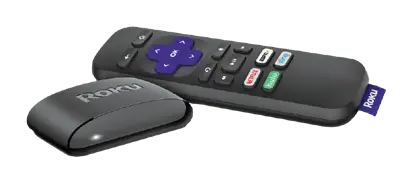
Roku streaming remote

Streaming Devices

TVs

Note: Pause Live TV is not available on the Roku device. We recommend the Amazon Fire TV Stick for full pause, catch-up and restart functionality

Mobile Devices

Note: Some streaming capabilities may be limited by the age of the streaming device.

Unfortunately, you cannot use voice controls to change the channels or control your Cornerstone Streaming TV app.

Some streaming devices, such as Amazon Fire TV, Apple TV and Roku, may allow you to configure a smartphone to control your device much like a traditional TV remote control. Consult the instructions for your device to learn how.

Fire TV users may use the thumbnail feature on their DVR recording timeline. To do that, follow these steps: 

If you have a weak Wi-Fi signal, your streaming device may not perform as well as it should. In this case, you may consider purchasing a device to extend your wireless signal coverage, such as Mesh devices, or use an Ethernet adapter to connect your device to the internet using a cable. Some streaming devices, such as Apple TV and Roku, already come with a built-in Ethernet adapter. Note: Mesh devices will only work if the customer subscribes to our router/wireless service.

If you’re a diehard St. Louis Cardinals fan, you get a dedicated channel for Cardinals baseball games. Watch the Cards play on Channel 77 or 78 if not televised on major networks like ESPN.

For an optimum viewing experience, use the USB power adapter supplied with your streaming device instead of just using the USB port on the TV. This is because the USB port is powered down when the TV is turned off (on most TVs). This causes your streaming device to lose power, and every time you turn on your TV, your streaming device has to power on and reboot. By using the USB power adapter instead, you can keep your streaming device from losing power — and you can start watching TV much faster.

To use a Fire TV, you will need to create an Amazon account. Visit amazon.com in your web browser. Hover your cursor over “Sign In.” Click “Start Here” on the dropdown menu that appears and follow the prompts to create a new account.

To use a Roku device, you will need to create a Roku account. Simply visit my.roku.com/signup and follow the prompts to create a new account.

Are you able to sign into the Cornerstone Connectivity app? If not, check your username/password combo. Your username is case sensitive. Every username begins with WKT (all uppercase) and ends with the randomly generated subscriber number given to you when your account is activated.

If you still have questions or are having issues, please call us at 844.997.5433 today!